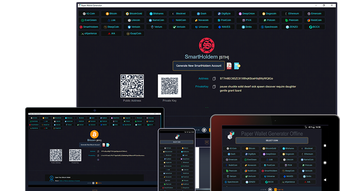

Download Paper Wallet Generator – Bitcoin, Altcoins, Offline Wallet, Secure Crypto Storage
Overview
The Paper Wallet Generator is a free, open-source desktop application designed for Android users in the Business and Productivity category. Its primary purpose is to generate cryptocurrency paper wallets offline, ensuring that private keys are never exposed to online networks. This approach mitigates the risk of digital theft, making it ideal for users seeking a high level of security for their Bitcoin and over 40 alternative cryptocurrencies. The software supports major coins such as Bitcoin, Ethereum, Litecoin, and Dogecoin, offering broad compatibility across popular digital assets.
Target users include individuals focused on long-term crypto storage, privacy-conscious investors, and those who prioritize cold storage solutions. The application is especially useful in scenarios where network connectivity must be completely avoided—such as during key generation in public or compromised environments. By disabling all network permissions, the software ensures that no data is transmitted during the creation process, reinforcing its commitment to security. The developer, TechnoL0g, has positioned this tool as a reliable, ad-free solution that requires no account registration, allowing users to maintain full control over their private keys from the outset.
Key Features & Capabilities
- Offline Generation – Creates cryptocurrency addresses and private keys without internet access, minimizing exposure to cyber threats.
- Multi-Coin Support – Offers compatibility with Bitcoin and more than 40 altcoins, including Ethereum, Litecoin, and Dogecoin.
- Single or Batch Wallets – Enables users to generate individual paper wallets or multiple wallets in one session.
- Print and Export Options – Supports printing or downloading generated wallets in various formats for physical or digital storage.
- Customizable Themes – Provides multiple wallet design themes to enhance readability and visual clarity when printed.
- BIP38 Encryption – Allows users to encrypt private keys with a passphrase, adding an extra layer of protection for stored keys.
- Brain Wallet Integration – Enables the creation of wallets using memorized passphrases, though users must exercise caution due to potential entropy limitations.
- Wallet Import Support – Facilitates loading existing wallets using private keys, passphrases, BIP38, BIP39, or WIF formats.
These features collectively support secure, user-controlled key management. For instance, a user preparing for long-term storage might generate a batch of wallets, encrypt them with BIP38, and print them on secure paper. Similarly, someone recovering a lost wallet can import it using a BIP39 seed phrase. The software’s design emphasizes usability without compromising security, making it suitable for both beginners and advanced users in the cryptocurrency space.
User Interface, Workflow & Performance
The user interface is structured to prioritize clarity and ease of navigation. Users are guided through a series of logical steps, starting with coin selection and ending with wallet generation and export. The workflow is streamlined, allowing users to generate a paper wallet in a few clicks. The layout is minimalistic, with clear labels and intuitive controls, reducing the chance of user error during critical operations.
Given that the software operates offline, performance is not dependent on internet speed or server response times. The application runs locally on the device, ensuring consistent responsiveness regardless of network conditions. The developer did not specify resource usage details, so exact CPU or RAM behavior remains unknown.
However, based on its file size of 1.5 MB and the nature of the task, it is likely to have low system footprint. Stability appears to be a priority, as the absence of ads and registration requirements suggests a focus on core functionality. No performance bottlenecks were reported in the provided information, and the software’s offline nature inherently reduces the risk of crashes caused by external dependencies.
Compatibility & System Requirements
The Paper Wallet Generator is designed for Android devices, as specified in the provided information. The latest version, 2.0, was released on July 15, 2024. The installation size is 1.5 MB, indicating a lightweight footprint suitable for most mobile devices. The developer did not provide additional system requirements, such as minimum Android version, RAM, or storage space. Compatibility with specific Android versions or hardware configurations is not detailed.
Platform compatibility information is limited to Android, and no details were provided about support for desktop operating systems like Windows or macOS. Users should verify whether the app is available on their specific Android device model and OS version. The absence of detailed hardware requirements means that users must rely on general device capabilities. For example, a device with sufficient storage to install the app and a printer for physical output would be necessary for full functionality.
Pros and Cons
Pros
- Completely free and ad-free with no account registration required.
- Offline operation ensures maximum security for private key generation.
- Supports over 40 cryptocurrencies, including Bitcoin and major altcoins.
- Offers BIP38 encryption and multiple wallet import methods for flexibility.
- Customizable print themes improve readability and usability of physical wallets.
- Open-source nature allows transparency and community verification of code.
Cons
- Only available for Android, limiting access for desktop users.
- No detailed system requirements were provided for device compatibility.
- Offline nature means no cloud backup or synchronization features.
- Users must manually manage and secure physical printouts.
- Brain Wallet feature may introduce security risks if weak passphrases are used.
FAQ Section
Is the Paper Wallet Generator safe to use?
The software is designed to operate offline and disables all network permissions, which significantly reduces the risk of data exposure. As a free, open-source tool, its code can be reviewed by the community for transparency. However, users must ensure they download it from official sources and avoid tampered versions.
Can I use this tool on Windows or Mac?
Based on the provided information, the software is only available for Android devices. There is no indication of support for Windows or macOS at this time.
Does the software require an internet connection?
No. The application is designed for offline use. All key generation and wallet creation occur locally without any network interaction, which enhances security.
What types of wallets can I generate?
Users can generate single paper wallets or multiple wallets at once. The software supports Bitcoin and over 40 altcoins, including Ethereum, Litecoin, and Dogecoin.
How do I recover a wallet I generated?
Wallets can be recovered using private keys, passphrases, BIP38, BIP39 seed phrases, or WIF formats. The software provides import options for all these formats to support recovery scenarios.
Final Thoughts
The Paper Wallet Generator stands out as a secure, lightweight, and user-friendly solution for generating offline cryptocurrency wallets. Its support for over 40 digital assets, combined with features like BIP38 encryption and customizable print themes, makes it a valuable tool for both novice and experienced users. The absence of ads, registration, and cost ensures accessibility without compromise. While its Android-only availability may limit some users, those seeking a trustworthy, open-source method for cold storage will find it highly effective. For anyone prioritizing security in cryptocurrency management, this tool delivers a reliable offline experience.
Download Paper Wallet Generator now







